Proxy Offline Browser
WebAssistant - Proxy Offline Browser is a neat trick. By passing all your web traffic through WebAssistant, you instantly and transparently build a copy of all the pages you visit - so they're yours to surf offline whenever you like. There's no difference between surfing the web and surfing your archive; you can even use your bookmarks or search your pages offline when you don't have a network connection. When online the proxy updates your cached web pages and adds new pages automatically. This feature distinguishes the utility from most other offline browsers.
Download Now
Operating Systems: Windows, Mac OS X, Linux
Requirement: Java of version 8 or higher
MM3-WebAssistant
- Private Edition 2019/460 (4 MByte)
Only for private use (gratis, freeware) - Professional Edition 2019/460 (5 MByte)
Additional features for professional use
Please test this edition free of charge for one month
You can buy this edition in the shop.
Please decompress the ZIP file after the download and click on the file: Installation.html
How it works
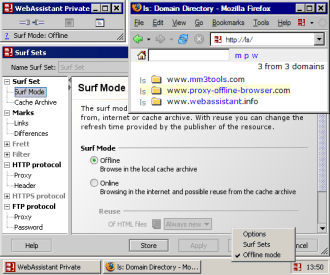
WebAssistant - Proxy Offline Browser is a personal proxy server sitting behind your regular browser (Firefox, IE, Safari, Opera - whatever!), silently and speedily handling all the network traffic. Each time you click on a link, WebAssistant displays the page as normal, but also adds it to an archive on your disk enabling offline access, bookmarking and searching.
Unlike most offline browsers, you don't have to specifically tell WebAssistant to capture a website - it remembers everything you see, automatically adding new pages to the cache. And when you're back online, WebAssistant updates your cached pages (in the background) so you've always got the latest version to hand.
Your Benefits
Work offline (train, plane, beach - wherever you like) without worrying that you have the info you need.
Reduces the pressure of knowing what to save,
and the necessity for repeating browsing sessions looking for something that was missed.
Incorporate the web into presentations or talks where you don't have internet access.
You can sure you'll always have the page you need with WebAssistant.
Mobile users have the flexibility of accessing information from the web without having to worry about expensive access points.
Shun overpriced wifi access ports - or at least only pay for what you really need.
WebAssistantPOB helps you to use the internet effectively everywhere.
Basic Features

- Automatically archive all pages visited.
- Accelerates in the web online browsing or updates the archive.
- No difference between on- and offline browsing.
- Browse also offline with your Bookmark and Favoriten collection.
- Browse original hierarchy of downloaded pages.
- Links to resources of cache archives are marked for quick navigation.
- Compare HTML pages from internet and archive. The changes are highlighted.
- Topic-specific archiving of web pages.
- Archives can be shared across multiple machines (and OS).
- Burn a site (or many sites) to CD for backup or archive.
- Supports the protocols HTTP and FTP.
- Caches the domain and IP address (DNS) for speedy web access.
- Available on many operating systems through the use of Java[TM] technology.
- Operating Systems: Windows, Mac OS X, Linux.
- Supplied with a detailed documentation, scenarios, tutorial and free e-mail support.
Additional Features of Professional Edition
- Search all the pages you visit:
- Keywords are highlighted in pages you search.
- No more trawling through search engines for a page you have already seen.
- Navigation with powerful archive browsing features:
- Short description of HTML and text files like the output of a search engine.
- Indicator shows available HTML files in sub-directories.
- Directory to be displayed can be reduced by a filter.
- Supports HTTPS protocol
- Filters unwanted content. Surf without adverts and other undesirable content.
- Mirroring of web sites.
- You can define how long a file can be re-used from the archive or when a new version is requested.
- Automatic prefetch of HTML pages
- Surf scenarios allow you to switch settings or archives for different locations.
- Updating the archived pages (Site monitoring).
- Reports and protocols.
- Free evaluation for one month.
The ideal addition to every browser
Why hesitate? Use the WebAssistant - Proxy Offline Browser when you browse next. You will find that you would not want to do without this Assistant anymore. Archive your favorite web sites by browsing.
Go To Download WebAssistant - Proxy Offline Browser
We say thank-you for the announcement WebAssistant - Proxy Offline Browser.