Quick Instruction - For experts
- Switch on the proxy of your system settings: Enter the protocol types HTTP, HTTPS and FTP
the address
127.0.0.1and port8080. - Check the configuration: http://127.0.0.1:8080/httpProxyConfiguration
Step-by-Step Instruction - You would like detailed instructions
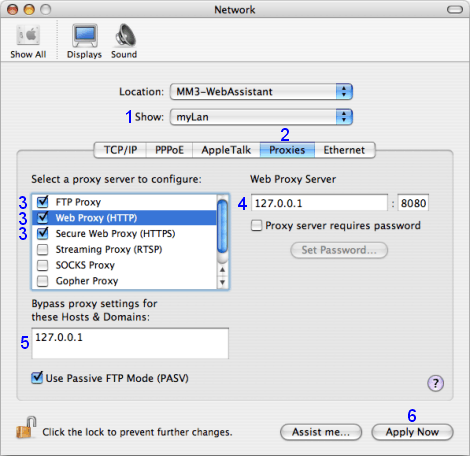
For the configuration you open the dialog Network in the System Preferences.
- 1 At Show select the LAN network component which you use for internet connection
- 2 Select tab Proxies
Note
At first if the lock symbol is closed, you must open the lock. You need administrator rights for the configuration.
- 3 Enable the proxies FTP, HTTPS as well as HTTP after each other and
enter respectively for the proxy server
4:
127.0.0.1:8080Note
If entries are already available here then you transfer these in the WebAssistant from Surf Set/Protocol/Proxy.
- 5 Please, enter:
Bypass proxy settings for these Hosts:
127.0.0.1 - 6 Click on: Apply Now
Check
Please, check this settings now:
http://127.0.0.1:8080/httpProxyConfiguration
You need the WebAssistant - Proxy Offline Browser for this check.
Disable the Proxy
You simply would like to switch between the direct connection and the connection with the WebAssistant, you set up two locations following the description.